
Mobile applications
Published and supported apps
Explore the apps, their core workflows, and the documents that explain how user data and service access are handled.
Featured app
Rotary Dialer
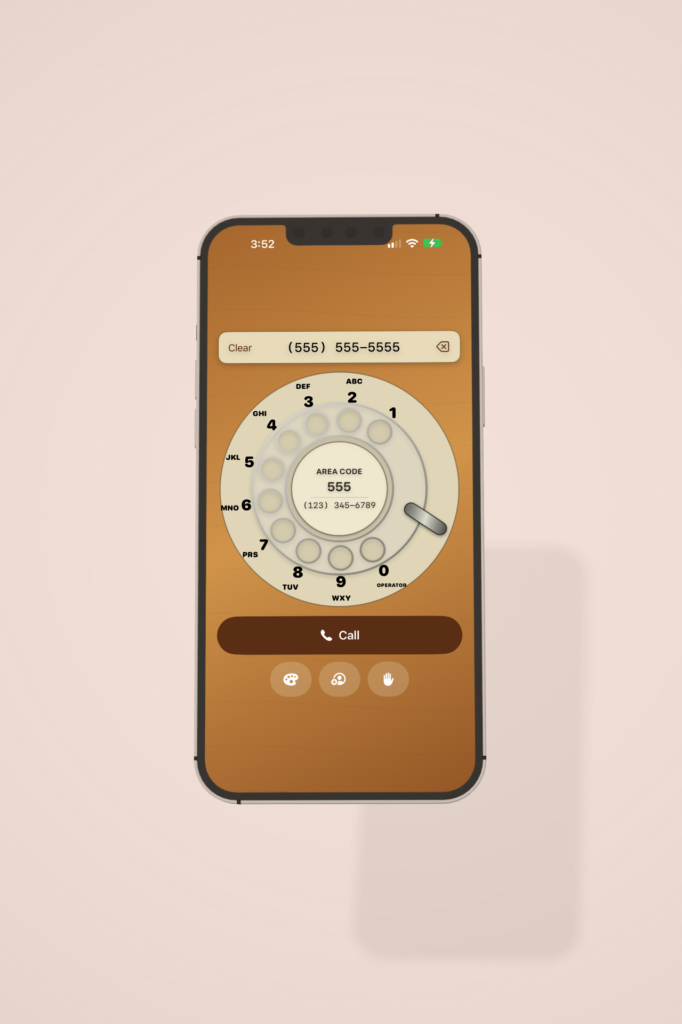
Remember when making a phone call took a little effort? Retro Rotary Dialer brings back the classic rotary phone, right on your iPhone.
Read more
Put your finger in the hole, spin the dial to the finger stop, and let go. Then do it again for every digit. It’s a fun, hands-on way to show kids and grandkids how phone calls were made for most of the last century, and a nostalgic trip for anyone who grew up with a rotary phone on the kitchen wall.
And it’s not just for show. Retro Rotary Dialer makes real phone calls.
DIAL IT YOURSELF
- Spin a faithful recreation of the classic rotary dial, complete with letters under each number
- Watch each digit appear as you dial, neatly formatted as a phone number
- Made a mistake? Tap backspace to remove a digit, or Clear to start over
- Tap Call when you’re ready to place the call
CALL YOUR CONTACTS
- Don’t feel like spinning ten digits? Pick someone straight from your contacts
- Choose a name and call them, no memorizing numbers required
PICK YOUR PHONE’S COLOR
Rotary phones came in every color of the decade, and so does this one. Choose from five vintage themes:
- Woodgrain: warm wood, like the family phone in the den
- Teal: cool and mid-century modern
- Red: bold, like a hotline to headquarters
- Avocado Green: straight out of a 1970s kitchen
- Blue: calm and classic
GREAT FOR
- Showing younger family members what “dialing” really means
- Classroom history lessons and show-and-tell
- Party challenges: who can dial a number fastest?
- Anyone who misses the satisfying whir of a rotary dial
No keypad. No speed dial. Just you, a finger, and a dial. Give it a spin!
Privacy Policy
Effective date: October 25, 2026
Rotary Phone Dialer does not collect, store, or share any personal information. This policy explains how the app works and applies to the app and to the Rotary Phone Dialer privacy-policy page.
Rotary Phone Dialer is a rotary-style dialer made by Kevin Grastorf (“we,” “us”). You dial a number on the on-screen rotary dial, and the app hands that number to your device’s built-in Phone app to place the call.
Information we collect
We collect no information. Specifically, the app does not:
- Collect your name, email, phone number, location, or any other personal information
- Store the numbers you dial, your call history, or your contacts
- Use analytics, advertising, or tracking tools
- Use cookies or device identifiers
- Send any data to us or to any server
Numbers you dial exist only for the moment it takes to pass them to your Phone app. Nothing is saved on your device or anywhere else.
Permissions and calls
The app requests no device permissions. It does not access your contacts, microphone, camera, location, photos, or storage.
When you finish dialing, the app opens your device’s Phone app with the number filled in. The call itself is placed and handled entirely by your Phone app and your mobile carrier, under their own privacy policies. We never see or receive any information about your calls.
Third parties
We do not share, sell, or rent any information, because we have none to share. The app store you downloaded the app from may collect information under its own privacy policy. We do not control or receive that data.
Children’s privacy
The app collects no information from anyone, including children under 13.
Changes to this policy
If this policy changes, we will post the updated version here and update the effective date above.
Contact us
Questions about this policy can be sent to Kevin Grastorf at kev.dev.com@gmail.com.
Terms of Service
Effective date: November 8, 2026
These terms govern your use of Rotary Phone Dialer (the “App”) on iOS and Android. By downloading or using the App, you agree to these terms. If you do not agree, do not use the App.
The App is provided by Kevin Grastorf (“we,” “us”), acting as a trader in the course of business.
Trader information
Legal name: Kevin Grastorf
Business address: PO Box 382
Email: kev.dev.com@gmail.com
Phone: (307) 250-4159
You can use these details to contact us directly about the App, including with complaints.
Using the App
License. We grant you a personal, non-exclusive, non-transferable, revocable license to use the App on devices you own or control, for your own non-commercial use, under these terms and the rules of the app store you got it from.
What the App does. The App lets you enter a phone number with an on-screen rotary dial, or pick one from your contacts, and then hands the number to your device’s Phone app. The App does not place calls itself.
Calls and charges. Every call is placed by your Phone app and your mobile carrier. You are responsible for any call charges, and for checking a number before you call it.
Emergency calls. Do not rely on the App to call emergency services. Use your device’s built-in Phone app or emergency call feature instead.
Acceptable use. You agree not to copy, modify, reverse engineer, resell or redistribute the App, except where the law allows this regardless of these terms. You agree not to use the App to make calls that are unlawful, harassing or abusive.